Testing
Now that training is complete and the best model has been selected and moved, we proceed to the testing phase. The following steps configure and run inference using the trained model on graphs of various sizes.
Switch to inference mode:
Edit rlsolver/methods/eco_s2v/config.py.
TRAIN_INFERENCE = 1                                              # 1 = inference mode
NUM_TRAINED_NODES_IN_INFERENCE = 20              # model was trained on 20-node graphs
NUM_INFERENCE_NODES = [20, 100, 200, 400, 800]   # test on graphs of various sizes
NUM_INFERENCE_SIMS = 50                          # number of parallel environments in inference
Although the model was trained only on 20-node graphs, it can be applied to larger graphs. Ensure that all test graphs have node counts ≥ 20.
Run inference:
Run rlsolver/methods/eco_s2v/main.py.
python rlsolver/methods/eco_s2v/main.py
This step uses the selected best model to run inference over all test instances.
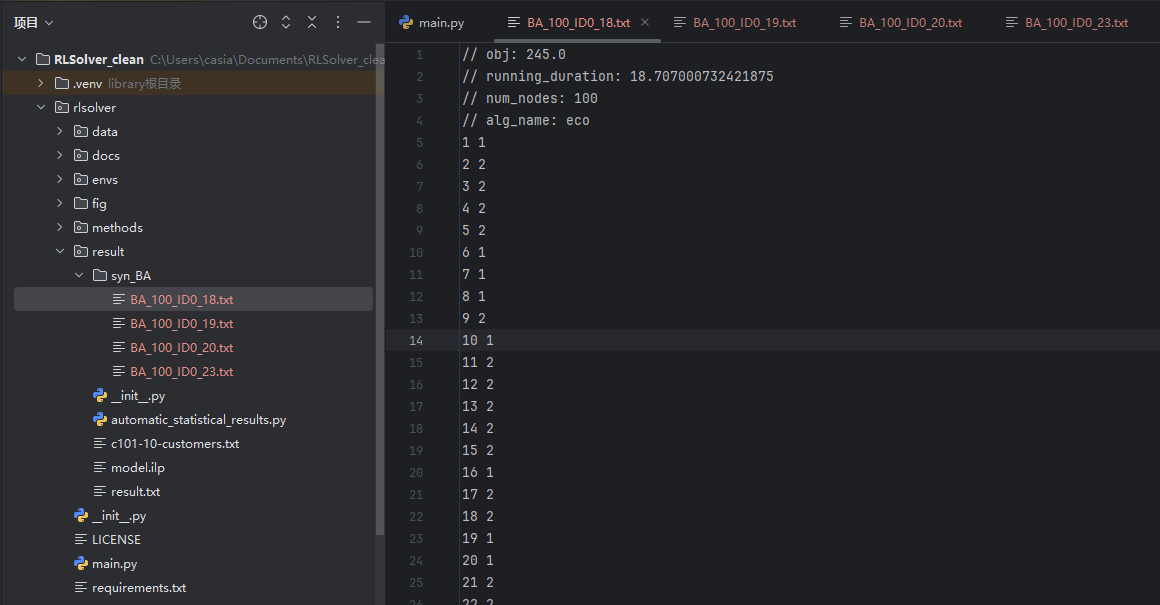
The result files will be saved in: rlsolver/result/syn_BA/
Each result file includes:
obj: best objective value (maximum cut size)running_duration: solving time in secondsnum_nodes: number of nodes in the graphalg_name: algorithm used (e.g.,eeco)node assignments: each node’s group (1 or 2)
Example output:
This completes the full pipeline: Training → Model Selection → Inference for the eeco (or s2v, or eco) method on synthetic BA graphs.